iCreateOFX Nationwide OFX Converter
Convert Nationwide BS (UK) CSV files to OFX.
- Convert Nationwide FlexAccount CSV files to OFX
- Convert Nationwide esavings CSV files to OFX
- Convert Nationwide Creditcard CSV files to OFX
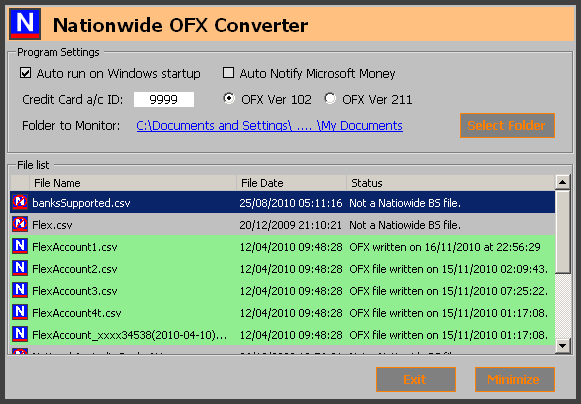
The interface consists of six (5) customizable settings. These are, from the top left (also see main image).
- Auto run on Windows startup: Select this box if you would like Nationwide OFX Converter to run each time you start windows.
-
Auto Notify Microsoft Money*: This option will only be enabled if the system has a program associated with OFX files. Select this box if you prefer PayPal OFX Converter to send the
written OFX file to Microsoft Money (or the associated program for OFX files - see below).
* Note that this feature will only prompt you to run the program that is associated with OFX files on your system, which may / may not be Microsoft Money. The associated program's executable name may be displayed instead. - Credit Card A/C ID: Please specify 4 digits to identify your credit-card OFX file to your PFM. By default, an account number of ****9999 is applied to credit-card OFX files. Other Nationwide CSV files contain respective account identification details for writing a valid OFX file.
- OFX Version: Select the required OFX format that your PFM accepts. This is either OFX Version 102 or Version 211. Some Personal Financial Manager(s) (PFMs) support either or both of the versions. You can try each version to find out which one is imported by your PFM.
- Folder to Monitor / Select Folder: This setting is discussed in detail under Operation and Usage below.
NOTE: You can start the help file by pressing the F1 key.
Operation and usage.
On startup, the program will scan the selected folder (by default, this set to the user's My Documents folder) for all CSV and QIF files, determining whether the CSV files are Nationwide Building Society (new or old) CSV files. For each Nationwide CSV file, an OFX file of the same name as the CSV file, but with the extension changed to .OFX, will automatically be written in the folder OFX Files under the current selected folder. For example, a Nationwide CSV file saved as Statement Download 2011-Nov-25 12-00-07.csv will have a corresponding OFX file of Statement Download 2011-Nov-25 12-00-07.OFX in the OFX Files directory. QIF files containing supported accounts will also have correspondingly named OFX files written as explained above.
Additionally, any CSV or QIF file that is added to the target folder while Nationwide OFX Converter is running will be scanned, and if it is a Nationwide BS CSV file or a supported QIF Account**, a corresponding OFX file written to the destination folder as described above.
You can also re-write an OFX file by double clicking the file name in the grid, OR right-clicking on the CSV or QIF file in the list and selecting Re-Write OFX File.
The Exit button closes the program, while the Minimize button minimizes the program to the System tray. You can recall the interface to the fore by simply clicking on the icon that appears in the system tray on minimizing.
Nationwide OFX Converter is NOT free-ware and is in no way affiliated to Nationwide Building Society. The program is available on a No Obligation 30 Day trial period at the end of which a one-time license fee is payable.